You have a Google Search Console account. Someone set it up months ago, and you open it when a client asks "how is our SEO doing." Then you stare at four numbers and a wavy line and close the tab. This guide fixes that. By the end you will know what each number means and how they relate, which is most of the battle.
What Search Console is
Google Search Console is Google's own record of how your site performs in organic Google Search, measured when your result appears and when someone clicks it. "Organic" means the unpaid blue links, not ads. It is the truth source for one thing: your presence in Google Search before the visitor lands on your site.
Two boundaries matter. It only covers Google (not Bing, not social, not direct traffic), and only up to the click. What a visitor does after they arrive (pages viewed, time on site, conversions) lives in GA4. Search Console answers "did we show up, and did people click." Nothing more, and that is fine, because that question is hard to answer anywhere else.
Verifying a property
You must prove you own the site before you see data. Add a "property" as either a domain property (every subdomain and protocol under one roof, verified through your DNS) or a URL-prefix property (one exact address such as https://www.example.com/, verified by a file, a tag, or your analytics). Pick domain if you can; it is the cleaner, fuller picture.
The four metrics, and how they move together
Every performance report is built on the same four numbers. Once you know them, every report in the tool reads the same way.
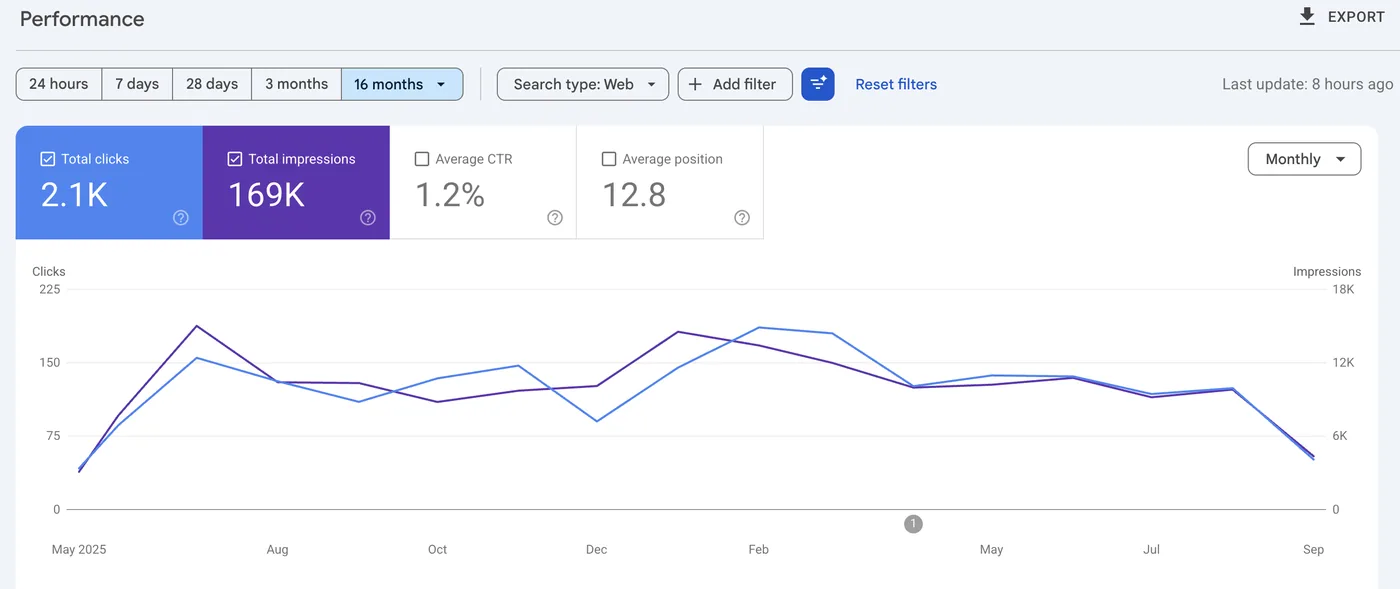
- Impressions: the number of times a link to your site appeared in someone's search results. It needs no click, and the user need not have scrolled to see it.
- Clicks: the number of times someone clicked through from search results to your site. A real visit begins here.
- CTR (click-through rate): the share of impressions that turned into clicks. The formula is
CTR = clicks ÷ impressions, shown as a percentage. 50 clicks from 1,000 impressions is a 5% CTR. - Average position: the mean ranking of your result across all those impressions. Position 1 is the top of the page, so a lower number is better. Going from 8.0 to 3.0 is an improvement, not a decline.
Here is how they connect. Say a page sits at average position 8.0 with 2,000 impressions and a 2% CTR, which is 40 clicks. You improve the content and earn some links, and the page climbs to position 3.0. Higher up the page, more people see and trust the result, so CTR typically rises (say to 6%). On the same 2,000 impressions that is now 120 clicks. The position number dropped, CTR rose, and clicks tripled, with no change in how often you were shown.
The most common beginner mistake: reading average position as a score where higher is better. Position 1 beats position 10. When position goes down, celebrate.
Queries vs Pages
The same four metrics can be sliced by two main dimensions, which answer different questions.
- Queries: the actual words people typed into Google. This tells you what you are getting found for. "best running shoes" might bring 800 impressions; "running shoe repair" another 120.
- Pages: which URL on your site ranked. This tells you which content is doing the work.
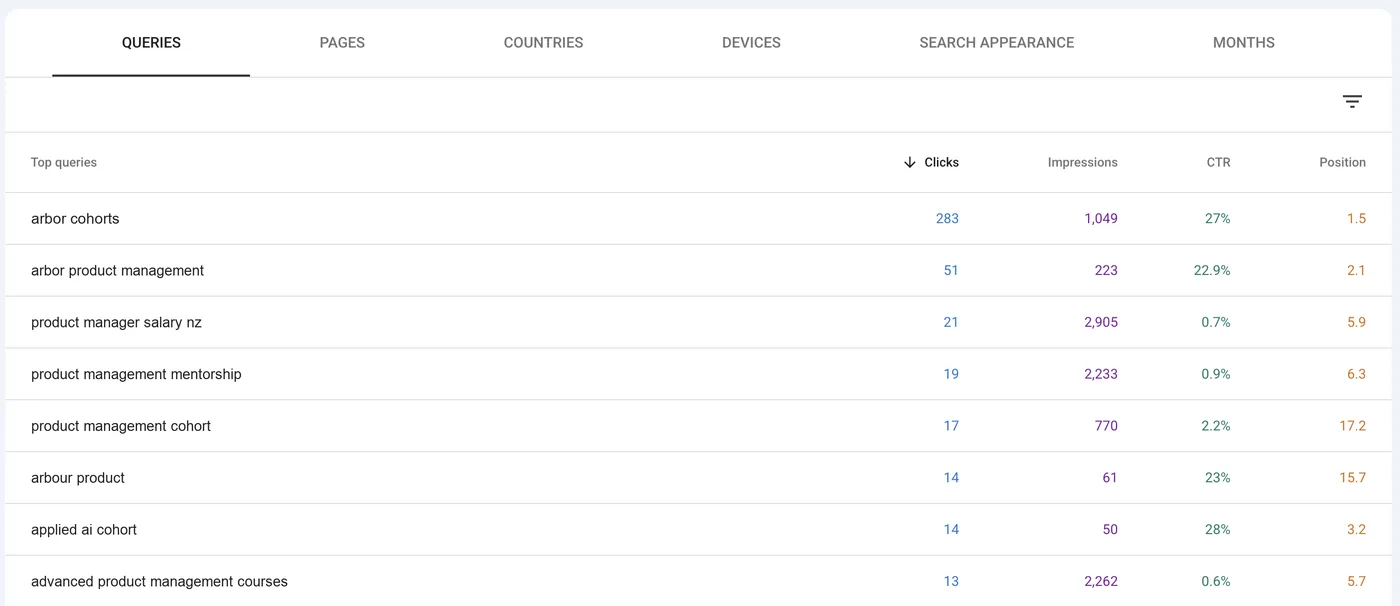
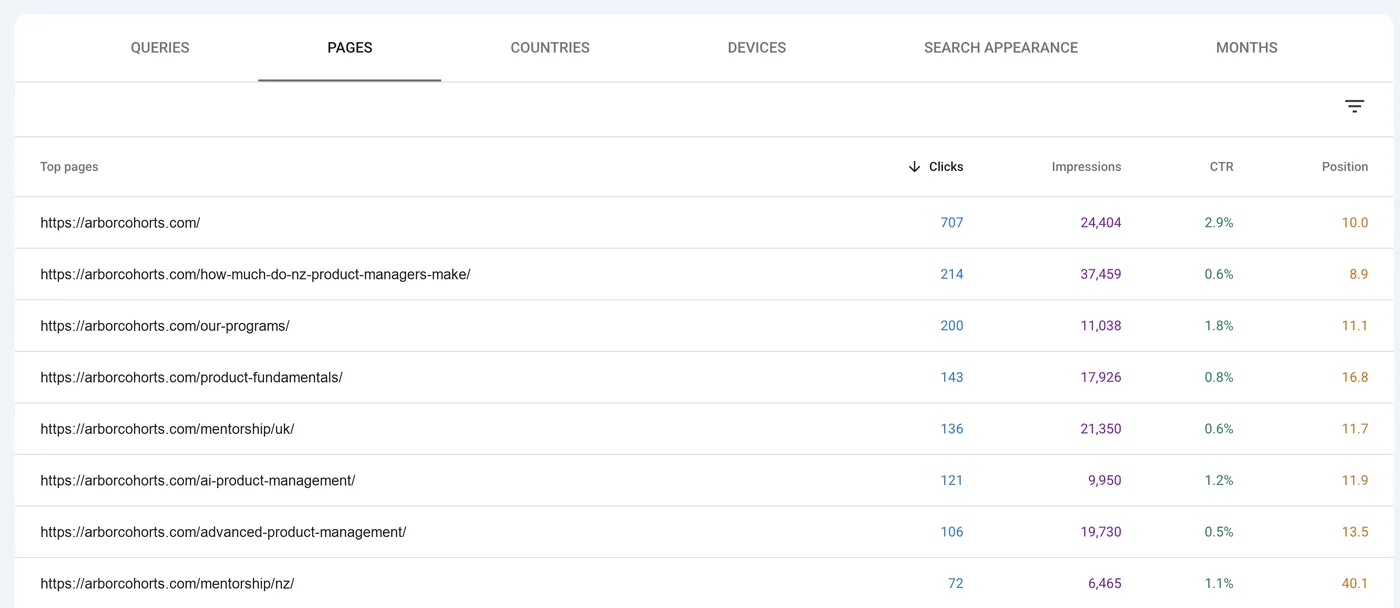
A trap: the totals across Queries and across Pages will not add up to each other or to the overall total. One search can show two of your pages, one page ranks for hundreds of queries, and Google withholds some low-volume query data for privacy. A query breakdown summing to fewer clicks than the headline number is normal, not a bug. Read each dimension on its own; they were never meant to reconcile.
The data lag
Search Console is not live. Its data typically runs 2 to 3 days behind. If you open it on a Monday, the last day or two may be missing or still filling in, because Google processes the data before publishing it. Do not panic about "missing" clicks for yesterday, and when you compare periods, keep both ends inside the settled window.
What Search Console is not
This is where most confusion starts. Search Console is pre-click search data. It says nothing about what people do on your site, so its clicks will rarely match the organic sessions GA4 reports for the same dates. That mismatch is expected.
Clicks are a Google Search event. Sessions are an on-site event. Counting two different things in two different systems gives two different numbers.
They measure different moments: Google logs a click when someone leaves the results page, while GA4 logs a session when a visitor's browser loads your site and runs the tag. Redirects, ad blockers, bounced loads, consent banners and bot filtering all pull the two apart. For the causes and acceptable ranges, see why Search Console and GA4 don't match. If GA4 is new to you, start with our GA4 for beginners guide.
Keep this one
Cheat sheet
| Metric | What it is | Formula / note |
|---|---|---|
| Impressions | Times your result appeared | Counted whether or not it was clicked |
| Clicks | Clicks through to your site | The start of a real visit |
| CTR | Impressions that became clicks | clicks ÷ impressions, shown as a % |
| Average position | Mean ranking of your result | Lower is better; position 1 is the top |
In Clearly
Connect a Search Console property once and Clearly reads the same four metrics straight from Google's API, no copy-paste. Clicks, impressions, CTR and average position render as scorecards at the top of the page, each with a period-over-period delta already coloured correctly (position falling counts as good). Below them, the Queries and Pages breakdowns sit one tab apart.
The bigger win is putting sources side by side. In one report you can place organic clicks from Search Console next to organic sessions from GA4 and see the gap on the same dates and screen. That turns the discrepancy from a worry into a number you can explain to a client. Clearly is built around that cross-source view.
Where to go next
Impressions and clicks are counts, CTR is clicks divided by impressions, and average position is a ranking where lower wins. Remember the 2 to 3 day lag, treat Queries and Pages as separate views, and never expect the numbers to tie out against GA4. Now open your account, look at the last 28 days, and read the four scorecards as one story.
The series
All nine Platform 101s, in setup order
What each platform does, what it costs, how to set it up, and what its numbers mean.